Growing from one location to two is exciting. Growing from two to ten can be overwhelming if your tools do not scale with you. A multi-store POS with centralized management lets you run every location from a single backoffice, ensuring consistency, visibility, and control without requiring you to be physically present at each site. SmartPOS AI was built from the ground up with multi-location businesses in mind. For the strategic side of scaling across locations, see our multi-location POS management article. Here is how it works.
Centralized Backoffice for All Locations
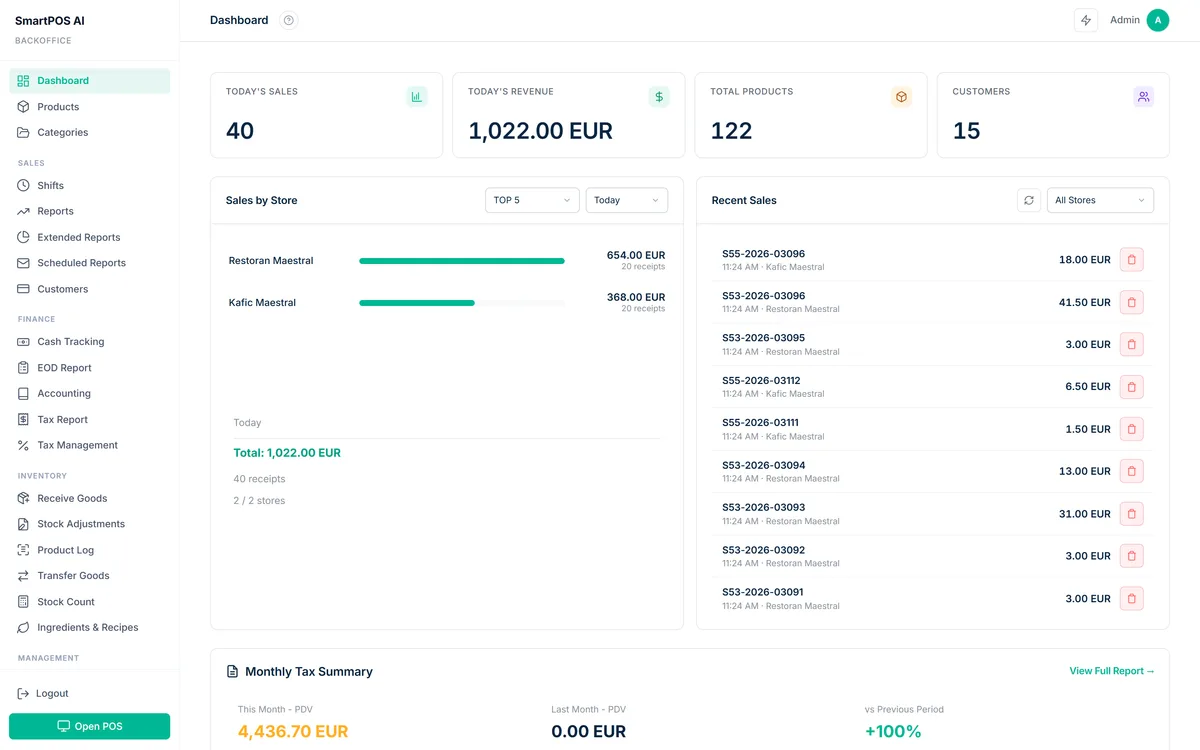
The SmartPOS AI backoffice is your command center. When you log in, you see a location selector at the top of the dashboard. Switch between stores to view location-specific data, or select "All Locations" for a consolidated view. Products, categories, employees, customers, and settings can be managed globally or per location depending on your needs.
Adding a new location is straightforward. Create it in the backoffice, configure its address and operating hours, assign employees, and choose whether to share the parent product catalog or create a location-specific menu. The new store inherits your existing settings by default, so you do not have to rebuild everything from scratch.
Per-Store Settings and Tax Rates
Different locations often have different requirements. A store in one city might have a different sales tax rate than a store in another. One location might be a restaurant with table service while another is a retail counter. SmartPOS AI supports per-store configuration for tax rates, receipt templates, payment methods, operating hours, and business type.
This flexibility means you can tailor each location to its local regulations and market without compromising the centralized oversight. Tax changes in one jurisdiction are updated for the affected store without touching the others.
Cross-Location Inventory Visibility
One of the biggest challenges of running multiple stores is knowing where your stock is. SmartPOS AI provides a cross-location inventory view that shows on-hand quantities for every product at every location in a single table. If a customer at Store A wants an item that is out of stock but available at Store B, your staff can see that instantly and arrange a transfer or direct the customer to the other location.
Stock transfers between locations are tracked within the system. The sending store creates a transfer order, the receiving store confirms receipt, and inventory levels update at both ends. This eliminates the informal, error-prone practice of moving stock between stores without documentation. For a deep dive into reorder points, ABC analysis, and AI-powered restocking, see our inventory management with POS guide.
Shared vs. Independent Catalogs
Some multi-store businesses sell exactly the same products at every location. Others have location-specific items, for example a bakery that offers seasonal specialties only at its flagship store. SmartPOS AI supports both models. A shared catalog pushes product changes to all locations simultaneously. Independent catalogs let each store maintain its own products while still rolling up to consolidated reports. You can also use a hybrid approach where core products are shared and each location adds its own extras.
Consolidated Reports
Data is only useful when it is easy to access and compare. SmartPOS AI generates consolidated reports that aggregate sales, revenue, costs, and profit across all locations. The store summary report gives you a snapshot of each location's performance side by side, including total sales, transaction count, average ticket size, and top-selling products.
Multi-Store Comparison
The comparison report lets you benchmark locations against each other over any date range. Which store has the highest average transaction value? Which one sells the most units per hour? Where is employee productivity strongest? These insights help you identify best practices at your top-performing locations and replicate them across the chain.
You can drill down from the consolidated view into any individual store for detailed reports, including hourly sales patterns, product performance, payment method breakdowns, and employee metrics. Every report is exportable to CSV or PDF for sharing with partners, investors, or your accounting team.
Employee Management Across Stores
With multiple locations comes a larger, more complex workforce. SmartPOS AI lets you manage all employees from the centralized backoffice. Each employee is assigned to one or more locations, and their permissions can vary by store. A manager at one location might be a regular cashier at another if they are covering a shift.
PIN codes work across all locations, so an employee who floats between stores does not need a new login for each one. Shift records, performance data, and attendance are tracked per location, giving you a complete picture of each team member's contributions regardless of where they work on a given day. Our employee management with POS guide covers PIN login, role-based permissions, and performance tracking in detail.
Executive Dashboard Overview
For owners and executives who need a high-level view, SmartPOS AI provides an executive dashboard. This single screen shows key performance indicators across the entire business: total revenue, year-over-year growth, top-performing locations, best-selling products company-wide, and alerts for any store that is underperforming against its targets.
The dashboard updates in real time. During a busy Saturday, you can watch revenue climb across all locations simultaneously. If one store is lagging, you can investigate immediately by drilling into its data. This level of visibility turns multi-store management from a reactive, firefighting exercise into a proactive, data-driven discipline.
Scaling a business is hard enough without your tools holding you back. A centralized POS gives you one source of truth for every location, every employee, and every transaction.
Ready to Scale
Whether you are opening your second location or your twentieth, SmartPOS AI grows with you. The centralized backoffice, flexible store configuration, cross-location inventory, and consolidated reporting ensure that adding a new store means adding revenue, not complexity. Start your free trial and experience centralized multi-store management firsthand.