Opening a second location is one of the most exciting milestones for any retail business. It also introduces a new class of operational challenges: keeping inventory consistent across stores, understanding performance at each location, managing employees who might work at different branches, and maintaining a unified view of the entire business without drowning in spreadsheets and separate logins.
SmartPOS AI is built from the ground up to support multi-location businesses. Whether you operate two stores or twenty, the platform provides a single centralized dashboard that gives you full visibility and control across every location. For a complementary perspective on scaling retail operations, check out our multi-store POS management guide. Here is how it works.
Centralized Backoffice Dashboard
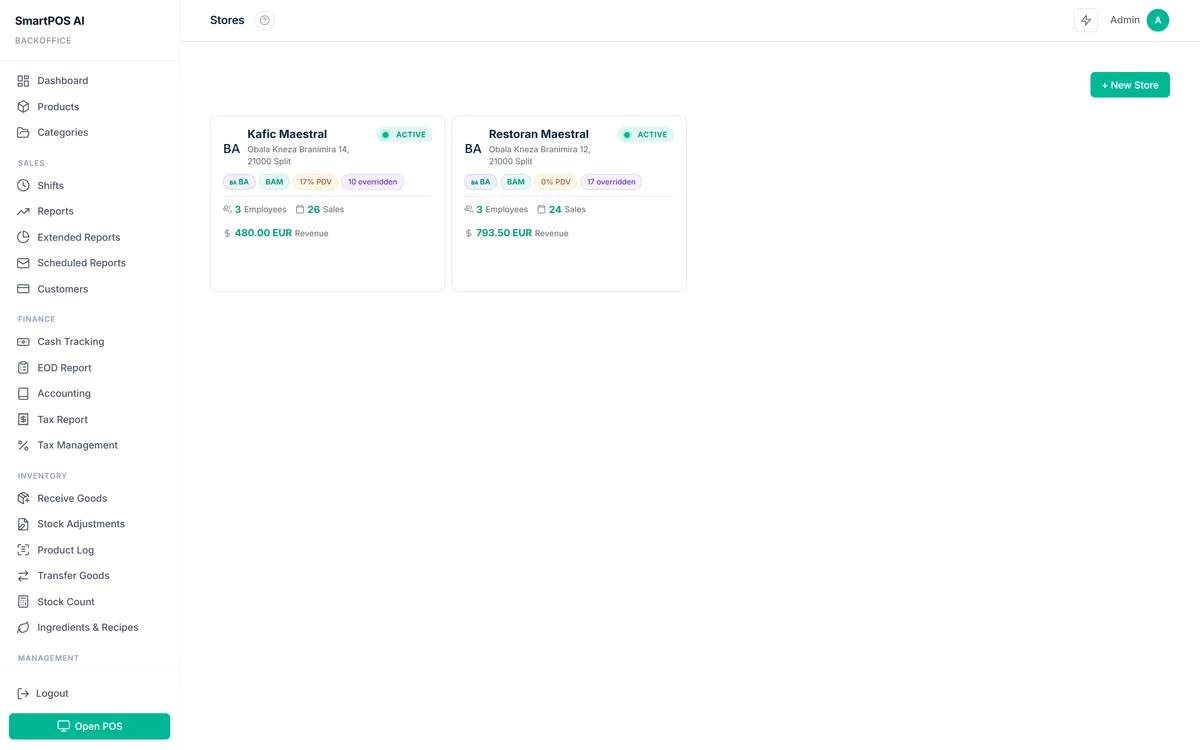
When you add a new store location in SmartPOS AI, it appears as a selectable entity in your backoffice dashboard. You can switch between locations with a single click to view location-specific data, or select "All Locations" to see aggregated numbers across your entire business.
The dashboard's key metrics — revenue, transaction count, average ticket size, top products, and more — all respond to the location filter. This means you can compare performance between stores side by side, identify which location is growing fastest, and spot underperformance before it becomes a serious problem.
There is no limit to the number of locations you can manage from a single account, and adding a new store takes just a few minutes. Each location gets its own POS configuration while sharing the master product catalog and customer database.
Cross-Store Inventory Visibility
One of the biggest challenges for multi-location businesses is inventory management. A product that is out of stock at one store might be overstocked at another, leading to lost sales at the first location and tied-up capital at the second.
SmartPOS AI provides cross-store inventory visibility directly in the backoffice. For any product, you can see the current stock level at every location in a single view. This makes it immediately obvious where imbalances exist and where stock needs to be moved.
The AI demand prediction feature works at the per-location level, analyzing each store's individual sales patterns and recommending restock quantities tailored to that specific location. A product that sells twice as fast at your downtown location compared to your suburban store will generate appropriately different restock recommendations for each.
Stock Transfers Between Locations
When you identify an inventory imbalance, SmartPOS AI makes it straightforward to initiate a stock transfer. From the backoffice, you select the source location, the destination location, and the products and quantities to transfer. The system creates a transfer record, adjusts stock levels at both locations, and maintains a complete audit trail.
Transfer records are accessible in the reports section, so you can track how much stock is moving between locations and whether certain stores consistently need inventory redistributed. Over time, this data helps you optimize your initial stocking strategy to reduce the need for transfers altogether.
Per-Store Settings and Customization
While your product catalog and pricing are typically consistent across locations, some settings need to vary by store. SmartPOS AI supports per-location configuration for:
- Tax rates — Different locations may fall under different tax jurisdictions, especially if you operate across state or national borders.
- Payment methods — One store might accept a local payment method that is not relevant at another location.
- Receipt templates — Each location can display its own address, phone number, and custom messaging on receipts.
- Operating hours — Used by the AI engine and reporting tools to accurately model each store's traffic patterns.
- Floor plans — For restaurants and cafes, each location can have its own table layout configured in the floor plan editor.
These settings are managed from the centralized backoffice, so you do not need to log in to each store's POS terminal individually to make changes.
Multi-Store Reports
SmartPOS AI's reporting suite is fully multi-location-aware. Every report — sales dashboard, product performance, employee stats, category breakdown, hourly patterns, payment analysis, profit and loss, and more — can be filtered by individual location or viewed across all locations combined.
The multi-store comparison view is particularly valuable. It places two or more locations side by side so you can directly compare revenue, growth rates, average ticket sizes, and top-selling products. This makes it easy to identify best practices at your highest-performing store and replicate them across the chain.
The moment you open a second location, your business changes fundamentally. You cannot be in two places at once, which means you need a system that gives you eyes and ears in every store simultaneously.
Employee Assignment Across Locations
In many multi-location businesses, employees rotate between stores. SmartPOS AI handles this natively, building on the same employee management capabilities available to single-store businesses. Each employee has a single account with a single PIN, and they can be assigned to one or more locations. When they log in to the POS at any assigned location, the system recognizes them and applies their permissions and role.
Employee performance data is tracked per-location and in aggregate. If an employee works three days at Store A and two days at Store B, you can see their stats for each location separately or combined. This flexibility supports businesses with floating staff, seasonal workers, and employees in training who rotate through different stores.
Executive Dashboard for Business Overview
For business owners and executives who need a high-level view without getting into the weeds, SmartPOS AI offers an executive dashboard. This streamlined view presents the most critical KPIs across all locations: total revenue, growth trend, top and bottom performing locations, aggregate inventory value, and customer metrics.
The executive dashboard is designed to be the first thing you check in the morning. In under sixty seconds, you can assess the health of your entire business and decide where to focus your attention for the day. If a metric raises a concern, you can drill down into the detailed reports for that specific location with a single click.
Scale Your Business with Confidence
Whether you are preparing to open your second location or managing an established chain, SmartPOS AI provides the centralized control and per-location flexibility you need. There is no per-location surcharge and no complex setup process. Visit our pricing page to find the right plan for your business, or start your free 14-day trial to experience multi-location management firsthand. Our documentation includes step-by-step guides for setting up additional locations.