Inventory is the lifeblood of any retail or hospitality business. Carrying too much stock ties up cash and increases waste, while running out of popular items means lost sales and frustrated customers. A modern inventory management POS system eliminates guesswork by giving you real-time visibility into every product you sell, store, or order. Here is how SmartPOS AI turns inventory from a headache into a competitive advantage.
Real-Time Stock Tracking
Every time a sale is completed, a return is processed, or a manual adjustment is made, SmartPOS AI updates your stock levels instantly. There is no nightly batch sync and no spreadsheet to reconcile. The dashboard shows current quantities across all locations so you always know exactly what you have on hand, what is committed to open orders, and what is in transit from suppliers.
Because the system operates in the cloud, your data is accessible from any device. Whether you are behind the counter or reviewing numbers from home, the stock figures you see are always current.
Low Stock Alerts and Reorder Points
SmartPOS AI lets you set a minimum stock threshold for every product. When on-hand quantity drops below that threshold, the system sends an automatic low-stock alert via email or in-app notification. You can configure different thresholds per location, which is especially useful if a flagship store moves inventory faster than a quieter branch.
Reorder points go a step further. Based on your average daily sales velocity and your supplier lead time, the system calculates the exact quantity at which you should place a new purchase order. This prevents both stockouts and over-ordering.
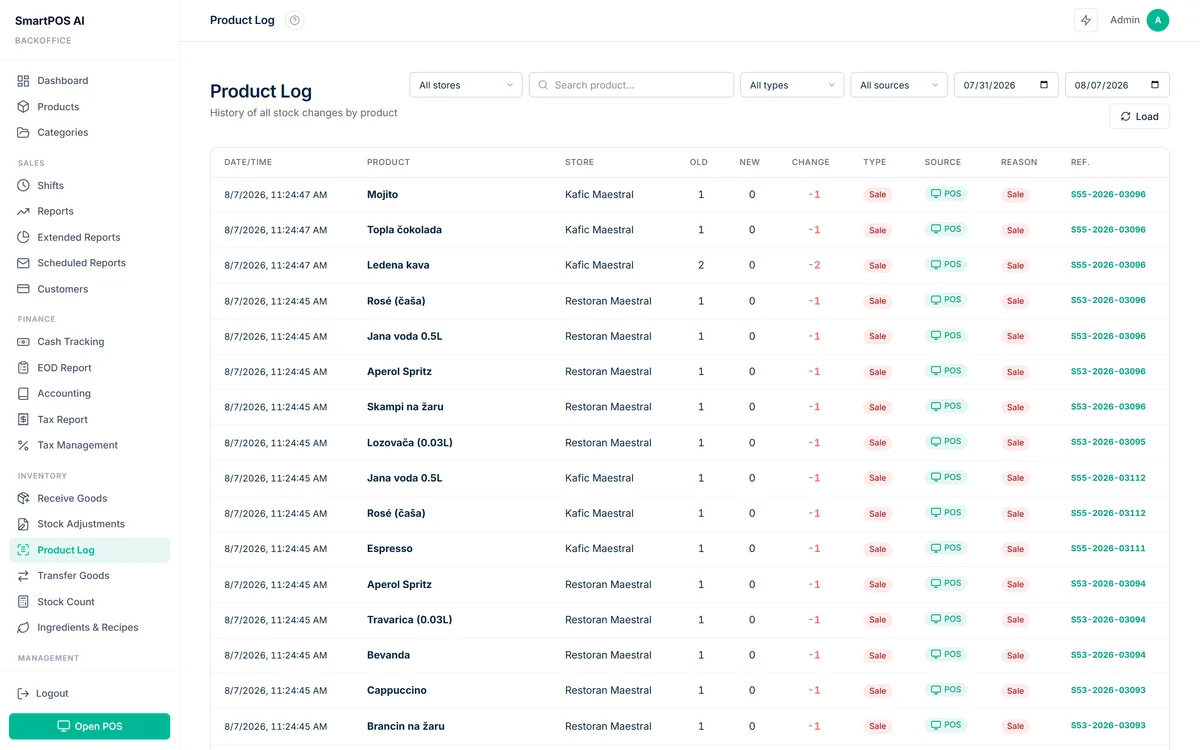
Stock Adjustments and Goods Receiving
Not every inventory change happens through a sale. Breakage, theft, staff meals in a restaurant, or promotional giveaways all affect your counts. SmartPOS AI provides a dedicated stock adjustment screen where you can increase or decrease quantities with a reason code. Every adjustment is logged with a timestamp and the employee who made it, creating a clear audit trail.
When a shipment arrives, the goods receiving workflow lets you scan or manually enter each item, compare delivered quantities against the purchase order, and flag discrepancies before the stock is accepted into the system. This single step eliminates the most common source of inventory errors.
Inventory Counts and Audits
Periodic physical counts are still essential for accuracy. SmartPOS AI supports full and partial inventory counts. You can count the entire store, a single category, or even a specific shelf. The system generates a count sheet, and as you enter actual quantities, it highlights variances. After review, you approve the count and the system adjusts stock levels automatically.
For businesses that need more frequent checks, cycle counting lets you audit a small subset of products every day rather than shutting down for a full count once a quarter.
CSV Import and Export
Migrating from another system or managing products in bulk is straightforward with CSV support. Export your entire product catalog, including SKUs, descriptions, prices, and current quantities, to a spreadsheet. Make changes offline and import the updated file. The system validates each row and reports any errors before committing changes, so you never end up with corrupted data.
ABC Analysis
Not all products deserve equal attention. ABC analysis in SmartPOS AI automatically classifies your inventory into three tiers. A items are your top revenue generators, typically around 20 percent of products driving 80 percent of sales. B items are moderate movers, and C items are slow sellers. This classification helps you focus purchasing, negotiate better supplier terms for A items, and consider discontinuing underperforming C items.
EOQ Calculation and Safety Stock
The Economic Order Quantity model balances ordering costs against holding costs to recommend the ideal order size for each product. SmartPOS AI factors in your purchase price, storage cost, and order frequency to calculate EOQ automatically. Combined with safety stock, a buffer quantity that accounts for demand variability and supply delays, these tools ensure you order the right amount at the right time.
Stock Turnover Analysis
Stock turnover ratio measures how many times you sell and replace inventory over a given period. A higher ratio generally means you are selling efficiently, while a low ratio may indicate dead stock. SmartPOS AI calculates turnover per product, per category, and per location, giving you a clear picture of where capital is moving and where it is stuck. These inventory metrics tie directly into your broader reporting workflow -- see our POS analytics and reporting guide for the full picture.
AI-Powered Restock Recommendations
This is where SmartPOS AI goes beyond traditional inventory tools. The AI engine analyzes historical sales data, seasonal trends, day-of-week patterns, and even upcoming promotions to generate restock recommendations. Instead of relying on static reorder points, the system adapts its suggestions dynamically. If a heatwave is forecast and your iced beverage sales have historically spiked during hot weather, the system will recommend increasing your order for those items before demand hits. To learn more about how these predictive models work, read our guide to AI-powered sales predictions.
Smart inventory management is not about having more stock. It is about having the right stock, in the right place, at the right time.
Getting Started
If you are currently tracking inventory with spreadsheets or a disconnected system, the transition to SmartPOS AI is straightforward. Import your existing catalog via CSV, set your reorder points and safety stock levels, and let the system start learning your sales patterns from day one. Within a few weeks, the AI recommendations will begin to reflect your unique business rhythm, helping you reduce waste, avoid stockouts, and free up working capital for growth.