Your team is the engine that drives daily operations. A modern employee management POS system does far more than ring up sales. It controls who can access what, tracks shifts down to the minute, and gives you the performance data needed to coach, reward, and schedule your staff effectively. Here is how SmartPOS AI handles every aspect of workforce management right from the point of sale.
Fast, Secure 4-Digit PIN Login
Speed matters at the register. SmartPOS AI replaces slow username-and-password logins with a quick 4-digit PIN. Each employee receives a unique code, and switching between users takes less than two seconds. This is especially valuable in restaurants and busy retail stores where multiple staff members share the same terminal throughout the day.
PINs are hashed and stored securely, so even if someone glimpses a colleague entering their code, the system logs every action to the individual who performed it. If a PIN is compromised, managers can reset it instantly from the backoffice without disrupting service.
Role-Based Permissions
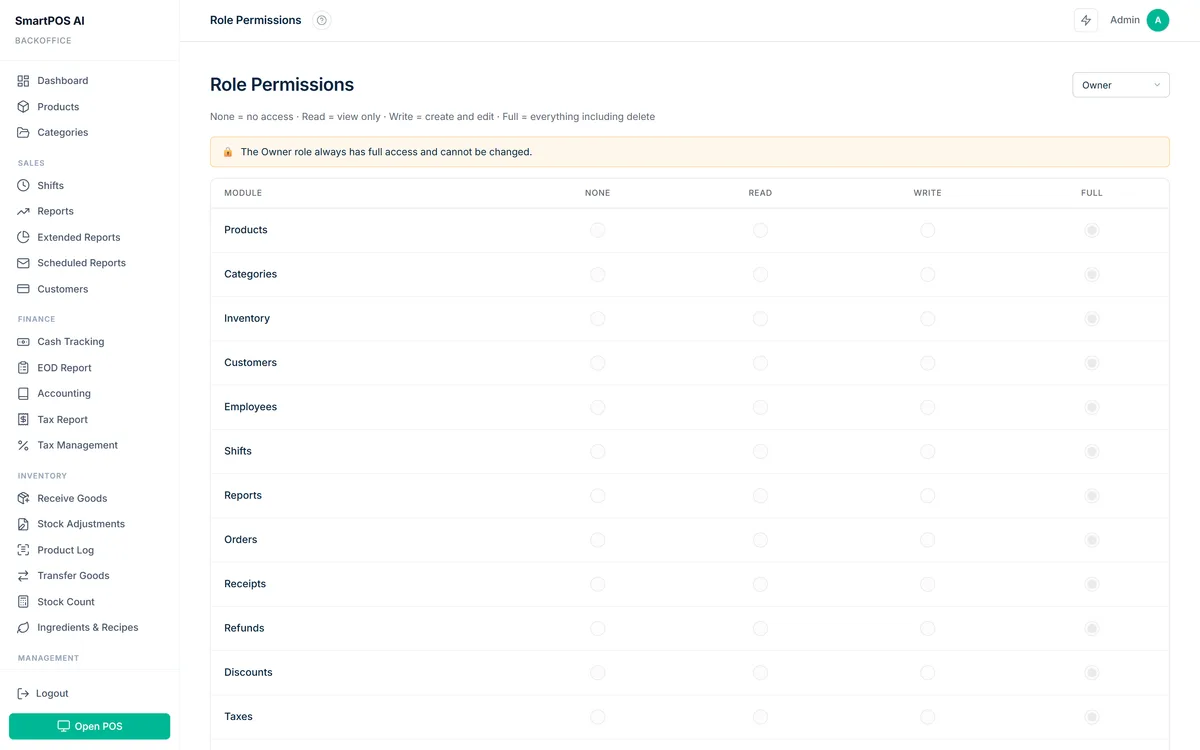
Not every employee needs access to every function. SmartPOS AI ships with four built-in roles: Owner, Admin, Manager, and Cashier. Each role has a carefully scoped set of permissions.
- Owner has unrestricted access to all settings, reports, billing, and data.
- Admin can manage products, employees, and reports but cannot change subscription or billing details.
- Manager can process sales, apply discounts, issue refunds, view shift reports, and manage daily operations.
- Cashier can complete sales and clock in or out but cannot access reports, change prices, or void transactions without manager approval.
Need something more granular? SmartPOS AI also supports custom roles. You can create a role with any combination of permissions, for example a senior cashier who can apply discounts up to a certain percentage but cannot issue full refunds. Custom roles ensure that your permission structure matches your actual management hierarchy. For a deeper look at securing your POS beyond roles, see our POS security best practices guide.
Shift Management with Cash Tracking
When an employee clocks in, SmartPOS AI opens a shift record that captures the starting cash float. Throughout the shift, every transaction, whether cash, card, or other payment method, is logged against that employee. At the end of the shift, the system prompts for a closing cash count. The difference between expected and actual cash is calculated automatically, highlighting any discrepancies.
This level of accountability reduces cash shrinkage and makes end-of-day reconciliation straightforward. Managers can review shift summaries in the backoffice, filter by date or employee, and export the data for payroll processing.
Checklists for Shift Open and Close
Consistency matters. SmartPOS AI lets you define checklists that employees must complete when opening or closing a shift. A coffee shop might require the opening cashier to verify that the espresso machine is clean, the display case is stocked, and the cash drawer matches the expected float. Closing checklists might include wiping down counters, restocking cups, and printing the Z-report. Each completed checklist is time-stamped and stored, so managers can verify compliance without being physically present.
Employee Performance Reports
Data-driven management starts with visibility. SmartPOS AI generates detailed performance reports for every team member. Key metrics include total sales value, number of transactions, average transaction value, items sold per hour, and upsell conversion rate.
Sales by Employee
The sales-by-employee report ranks your team by revenue generated over any selected period. Use it to identify top performers, spot training opportunities, and allocate staffing during peak hours. If one cashier consistently achieves a higher average basket size, study their approach and share those techniques with the rest of the team. For a comprehensive walkthrough of interpreting these figures, check out our guide to understanding POS sales reports.
Waiter Statistics
For restaurants, waiter-specific stats go beyond revenue. SmartPOS AI tracks table turnover time, average covers per shift, tip amounts where applicable, and speed of order entry. These metrics help you schedule your strongest servers during the busiest periods and provide targeted coaching for newer staff.
Bonus Calculation System
Rewarding strong performance keeps morale high and reduces turnover. SmartPOS AI includes a configurable bonus calculation system. You can set targets based on total sales, number of transactions, or specific product categories. When an employee hits their target, the system calculates the bonus automatically and includes it in the shift summary. Whether you run a simple percentage-of-sales commission or a tiered bonus structure, the POS handles the math so you can focus on recognizing your team.
The best employee management tools do not just track performance. They give your team the structure and feedback they need to succeed.
Putting It All Together
Managing employees through your POS eliminates the need for separate time-tracking apps, spreadsheet-based schedules, and manual cash reconciliations. SmartPOS AI centralizes all of these functions in one platform, reducing administrative overhead and giving you a single source of truth for workforce data. Whether you have two employees or two hundred, the system scales with your business and keeps everyone accountable, informed, and motivated.