Table management can make or break the dining experience. When the host cannot tell which tables are available, when servers lose track of their sections, or when a party of six has to wait because two adjacent four-tops were not merged in time, the result is longer wait times, frustrated guests, and lost revenue. A dedicated restaurant floor plan management POS solves these problems by putting a live, interactive map of your dining room right on the screen your staff already uses. Here is how SmartPOS AI approaches floor plan management.
Drag-and-Drop Table Layout Editor
Setting up your floor plan in SmartPOS AI takes minutes, not hours. The backoffice includes a visual editor where you drag table icons onto a canvas that represents your dining area. Tables come in multiple shapes, including round, square, and rectangular, and you can resize them to reflect actual seating capacity. Walls, partitions, bar counters, and outdoor sections can all be represented, giving your staff a map that closely mirrors the real layout.
If you rearrange furniture for a private event or seasonal patio seating, simply update the floor plan in the editor and every terminal reflects the change immediately. You can save multiple floor plan configurations and switch between them as needed, for example a standard weekday layout and an expanded weekend layout that includes patio tables.
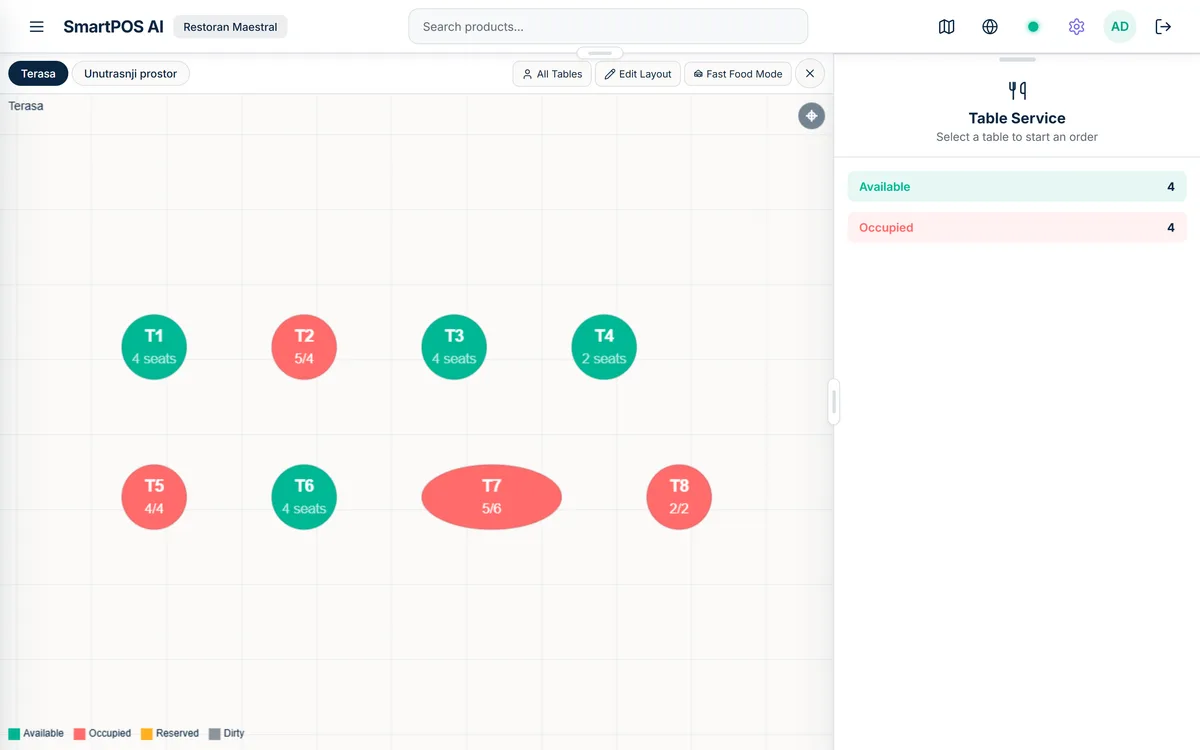
Real-Time Table Status
At any moment, every table in SmartPOS AI carries one of several statuses: available, occupied, reserved, or needs cleaning. These statuses update in real time as orders are opened, guests are seated, and bills are closed. The floor plan view uses color coding so hosts can scan the entire restaurant at a glance and know exactly where to seat the next party.
Occupied tables display additional context, including the server name, the number of guests, how long the table has been occupied, and the current order total. This information helps managers identify tables that may be lingering too long and gently prompt turnover during peak service.
Waiter Assignment per Table and Section
Assigning servers to specific tables or sections ensures balanced workloads and clear accountability. In SmartPOS AI, a manager assigns each waiter to a set of tables at the start of the shift. When a new order is opened on a table, the system automatically attributes it to the assigned server. This drives accurate tip tracking, performance reporting, and prevents confusion about who is responsible for which guests.
Sections can be adjusted on the fly. If a server calls in sick or if one section is busier than expected, the manager can reassign tables with a few taps without disrupting active orders.
Table Merging and Splitting
Large parties often need more than one table. SmartPOS AI supports table merging, which combines two or more tables into a single logical unit with one shared order. The merged table appears as a highlighted group on the floor plan, and the combined order can be managed, modified, and settled as one bill.
Splitting works in the other direction. If a group at a merged table wants separate checks, the system lets you split the order by guest, by item, or by equal shares. Each resulting bill is processed independently, and the tables return to their individual status once all bills are closed.
QR Code per Table for Self-Ordering
Each table in SmartPOS AI can have a unique QR code. Guests scan the code with their smartphone, browse the digital menu, place orders, and request the bill, all without waiting for a server to come by. Orders placed through the QR system appear instantly on the floor plan and flow to the kitchen display with the correct table number attached. Our QR code menu ordering guide walks through the full setup process and design tips.
Self-ordering does not replace your servers; it empowers them. Waiters spend less time taking routine orders and more time checking on guest satisfaction, recommending specials, and ensuring drinks are topped up. The result is faster service and a better experience for everyone.
Table Transfer Between Waiters
Shift changes happen mid-service, and guests should not feel the impact. SmartPOS AI supports seamless table transfers. When one server hands off a table to another, the system transfers the open order, including all items, modifications, and notes, to the new server. Both the outgoing and incoming server receive a notification, and the floor plan updates to reflect the new assignment. Tips and performance metrics are attributed accurately based on who served which portion of the meal.
Integration with Kitchen Display
Every order placed from the floor plan flows directly to the kitchen display system. The kitchen screen shows the table number, items ordered, any special instructions, and the elapsed time since the order was placed. Chefs tap items as they are being prepared and again when they are ready for pickup. The waiter sees a notification on the POS screen or on their mobile device, prompting them to deliver the food promptly. For a complete overview of how the kitchen display works end to end, see our kitchen display system guide.
This closed-loop communication between the floor plan, the order, and the kitchen eliminates handwritten tickets, reduces errors, and speeds up service. Managers can monitor kitchen performance from the floor plan view, spotting bottlenecks before they affect guests.
A well-managed floor plan is invisible to guests. They simply notice faster seating, attentive service, and food that arrives on time. That is the goal.
Start Mapping Your Restaurant
Whether you operate a cozy 10-table bistro or a sprawling multi-room venue, SmartPOS AI scales to fit your layout. Set up your floor plan in the backoffice, assign your team, and let the system handle the real-time coordination that keeps your dining room running smoothly. If you are still evaluating POS options for your restaurant, our guide to choosing a restaurant POS covers the key criteria to consider.