Every restaurant kitchen has experienced the chaos of a lost ticket. A server scribbles an order, clips it to the rail, and somewhere between the grill and the fryer it falls to the floor, gets splashed with grease, or simply gets buried behind a dozen other slips. Kitchen display systems solve this problem permanently by replacing paper with a digital order queue that is always visible, always legible, and always up to date.
What Is a Kitchen Display System?
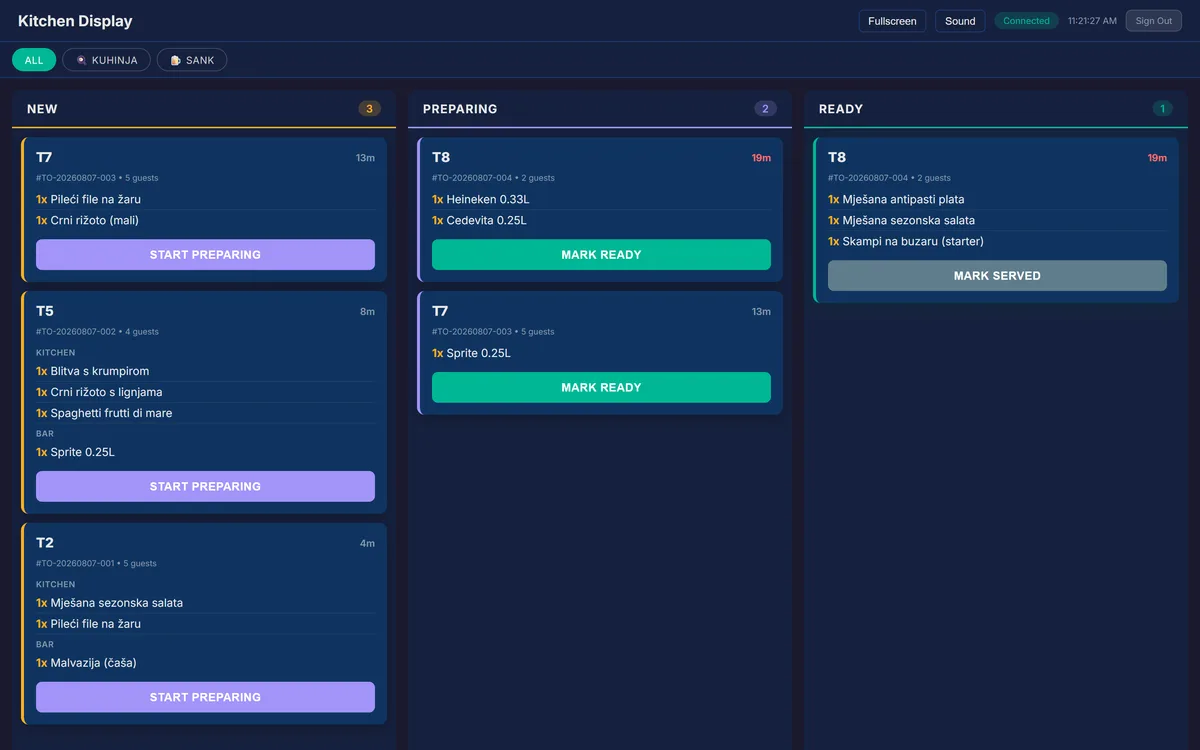
A kitchen display system, commonly abbreviated as KDS, is a screen mounted in the kitchen that shows incoming orders in real time. When a server submits an order from the POS terminal or when a customer places an order via QR code, the items appear on the kitchen screen instantly. Each order card displays the table number, the items to prepare, any special modifications, and the time since the order was placed.
The KDS replaces the printer that traditionally spits out paper tickets. There are no consumables to restock, no tickets to lose, and no handwriting to decipher. Everything is displayed in a clear, consistent digital format that the entire kitchen team can read at a glance.
How SmartPOS AI's KDS Works
The Accept, Ready, Served Workflow
SmartPOS AI organizes kitchen orders into a three-stage workflow that keeps everyone aligned:
- Accept: When a new order arrives on the KDS, a kitchen staff member taps to acknowledge it. This confirms that the kitchen has seen the order and is beginning preparation. The order card moves into the active queue.
- Ready: Once the dish is plated and ready to leave the kitchen, the cook marks it as ready. This triggers a notification to the assigned server, who knows it is time to deliver the food to the table.
- Served: After the server delivers the food, the order is marked as served and cleared from the display. The complete timeline of each order, from submission to delivery, is recorded for performance analysis.
This workflow ensures that no order is forgotten, no dish sits under a heat lamp longer than necessary, and managers have a clear audit trail of kitchen performance.
Real-Time Order Routing
Orders appear on the KDS the moment they are submitted, whether from a server's POS terminal, a QR code order from a guest's phone, or a delivery platform integration. There is no delay, no batching, and no manual transfer. The kitchen sees the order in the same second that the guest confirms it.
For restaurants with multiple kitchen stations, such as a grill station, a salad station, and a dessert station, SmartPOS AI can route individual items to the appropriate display based on product categories. This means each station only sees the items they are responsible for, reducing visual clutter and speeding up preparation.
Color-Coded Urgency
Time matters in a kitchen. SmartPOS AI color-codes each order card based on how long it has been waiting. Fresh orders appear in a neutral color, orders approaching your target preparation time shift to yellow, and orders that have exceeded the threshold turn red. This simple visual system lets the kitchen prioritize without needing to check timestamps on every ticket.
KDS for Fast Food and Quick Service
Kitchen display systems are not exclusive to full-service restaurants. In fast food and quick service environments, the KDS plays an equally critical role. When SmartPOS AI is running in fast food mode, orders are submitted directly from the counter without table assignment. Each order receives a sequential number, and the KDS displays it along with the items to prepare.
When the order is ready, the number is called or displayed on a customer-facing screen. This workflow is standard in burger joints, pizza shops, bubble tea counters, and any venue where customers order at the register and pick up at a window or counter.
Integration with Table Orders and QR Ordering
One of the most powerful aspects of a KDS is its ability to unify orders from every source into a single queue. In SmartPOS AI, a table order entered by a waiter, a QR code order placed by a guest, and a delivery order received from an external platform all flow into the same kitchen display. The kitchen does not need to check multiple screens or switch between apps. Every order, regardless of origin, follows the same accept-ready-served workflow. To learn how table layouts and order routing work together, explore our restaurant floor plan management guide.
This integration is especially valuable during peak hours when orders pour in from multiple channels simultaneously. Read our QR ordering guide to see how customer-placed orders feed directly into the KDS.
Benefits of Switching to a KDS
Reduced Errors
Paper tickets are handwritten or printed in small fonts, and modifications are easy to miss. A KDS presents every detail in a clear, structured format. Special requests, allergies, and item modifications are highlighted so the kitchen never overlooks them.
Improved Speed
The moment an order is placed, the kitchen sees it. There is no lag from printing, no walk from the server station to the kitchen window, and no pile of tickets to sort through. Studies consistently show that restaurants using a KDS reduce average ticket times by 15 to 30 percent.
Better Communication
The three-stage workflow creates a feedback loop between kitchen and floor. Servers know exactly when food is ready without shouting across the restaurant or hovering at the pass. Managers can monitor the queue from the backoffice to identify bottlenecks before they become problems.
Environmental and Cost Savings
Eliminating paper tickets means no more thermal paper rolls, no printer maintenance, and no ink replacements. Over the course of a year, these savings add up, and you contribute less waste to landfills.
Hardware Requirements
Running SmartPOS AI's KDS requires nothing more than a tablet or a screen with a web browser. Many restaurants repurpose an old iPad or mount an inexpensive Android tablet in the kitchen. Because the KDS is a web application, there is no proprietary hardware to purchase. Consult our setup documentation for recommended screen sizes and mounting options.
Get Started
If your restaurant is still running on paper tickets, switching to a KDS is one of the highest-impact changes you can make. Sign up for SmartPOS AI, enable the kitchen display in your backoffice settings, and mount a screen in your kitchen. You will wonder how you ever operated without it. Explore our pricing plans to find the right fit for your restaurant.