Restaurants have operational demands that generic point of sale software simply cannot meet. From managing a dining room full of tables to routing orders to the kitchen in real time, the POS system you choose must be purpose-built for food service. This guide covers the essential features every restaurant owner should evaluate before making a decision.
Table Management and Floor Plans
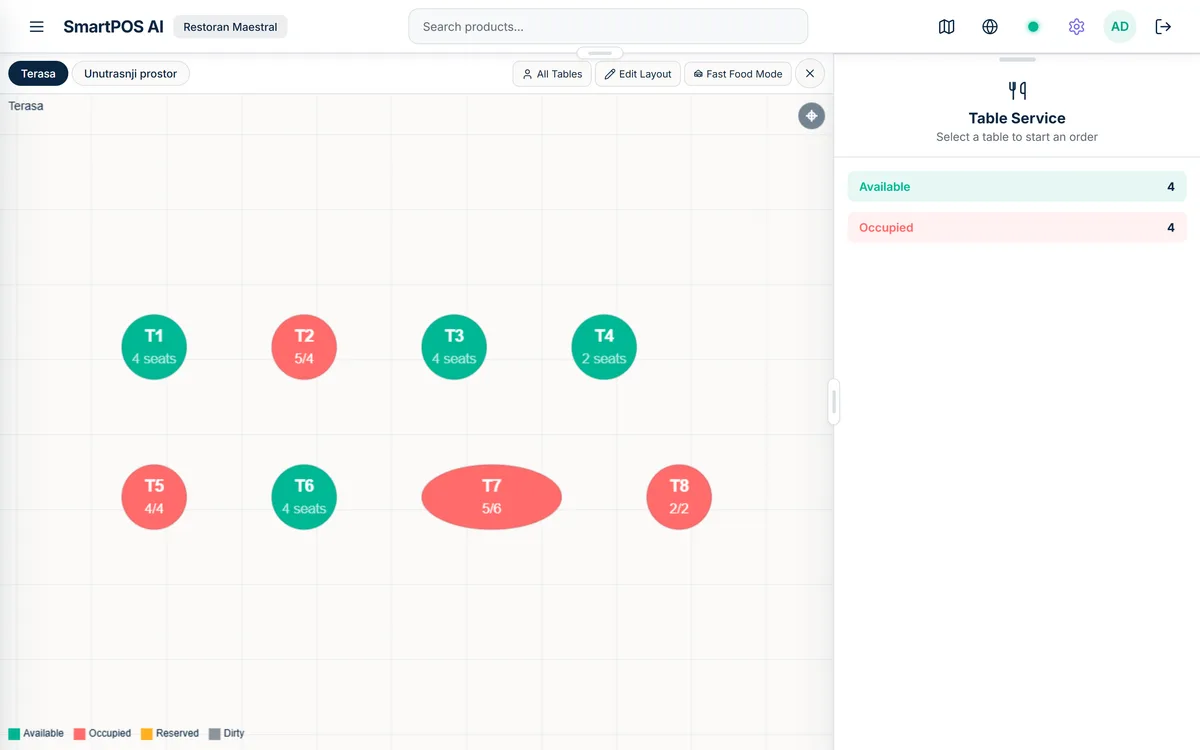
A restaurant POS must understand the physical layout of your venue. You need a digital floor plan where you can arrange tables, booths, bar seats, and outdoor areas to mirror your actual space. When a guest sits down, the server taps the table on the screen to open a new order. At a glance, managers can see which tables are occupied, which are awaiting payment, and which are available for the next party.
SmartPOS AI includes a built-in floor plan editor that lets you drag, drop, and resize tables across multiple rooms or zones. You can create different layouts for lunch and dinner service, and the system tracks time-at-table to help you optimize turnover during peak hours. For a deeper dive into layout design and zone management, see our restaurant floor plan management guide.
Kitchen Display System (KDS)
Paper tickets get lost, smudged, and misread. A kitchen display system replaces printed tickets with a live digital queue that updates the instant an order is placed. Cooks see each item, any modifications, and the table number on screen. When a dish is ready, the kitchen marks it as complete and the server is notified immediately. Our complete KDS guide covers the accept-ready-served workflow, color-coded urgency, and multi-station routing in detail.
SmartPOS AI provides a dedicated KDS view with an accept, ready, and served workflow. Orders are color-coded by age so the kitchen can prioritize items that have been waiting longest. For restaurants running both dine-in and takeout, the KDS separates order types to prevent confusion.
QR Code Menu Ordering
Contactless ordering is no longer a pandemic-era novelty; it is a permanent expectation for many diners. With QR code ordering, each table has a unique code that guests scan with their phone. They browse your full menu, add items to their cart, submit the order, and even request the bill, all without waiting for a server to arrive.
In SmartPOS AI, you generate QR codes directly from the backoffice. The customer-facing menu automatically reflects your current items, prices, and availability. If you run out of a dish mid-service, toggle it off and it disappears from the QR menu instantly. Customers can also tap a button to call a waiter if they need personal assistance. Read our complete QR ordering guide for a deeper walkthrough.
Bill Splitting and Flexible Payments
Few things frustrate diners more than a complicated bill-splitting process. Your POS should let servers split a check by seat, by item, by equal shares, or by custom amounts in just a few taps. It should also support mixed payment methods so one guest can pay by card while another pays cash.
SmartPOS AI handles all of these scenarios natively, with a clear visual interface that minimizes errors and speeds up table turnover at the end of a meal.
Waiter Assignment and Permissions
In a busy restaurant, accountability matters. Assigning waiters to specific tables or sections ensures that orders are attributed to the correct staff member, which supports fair tip distribution and performance tracking. Role-based permissions let you control who can apply discounts, void items, or access reports.
SmartPOS AI lets you create employee profiles with granular permissions. Each waiter logs in with a personal PIN, and every action they take is recorded for complete audit traceability. Learn how to configure employee roles in our documentation.
Fast Food and Quick Service Mode
Not every restaurant operates with table service. Quick service restaurants, food trucks, and counter-service cafes need a streamlined checkout flow that prioritizes speed. A good POS should offer a fast food mode that skips table selection entirely and moves straight to item entry, payment, and receipt.
SmartPOS AI includes a dedicated fast food mode with large category buttons, combo meal support, and a single-screen checkout flow designed to process orders in seconds. Kitchen orders are routed to the KDS automatically, with order numbers for customer pickup.
Course Management
Fine dining and multi-course restaurants need the ability to fire courses to the kitchen at the right moment. Rather than sending the entire order at once, the server marks when the table is ready for the next course, and only then does the kitchen see those items appear on the display. This prevents food from sitting under heat lamps and ensures each course arrives at the optimal time.
Delivery Platform Integration
If your restaurant works with delivery platforms like Wolt or Glovo, your POS must accept incoming delivery orders and merge them into the same kitchen workflow as dine-in orders. Without integration, staff end up managing a separate tablet for each platform, which leads to missed orders, incorrect preparation times, and frustrated customers.
SmartPOS AI supports integration with major delivery platforms so that all orders, regardless of source, appear in a single unified queue. This reduces errors and ensures the kitchen treats every order with equal priority.
Making Your Decision
The right restaurant POS saves your team hours every week, reduces order errors, and creates a better experience for your guests. SmartPOS AI was designed with every one of these restaurant-specific features built in, not bolted on as afterthoughts. Start your free trial to see how it fits your operation, or compare our pricing plans to find the right tier for your venue.