Your POS system records every transaction, every item sold, every discount applied, and every payment received. But raw data is only useful if you know how to read it. Too many business owners check their daily total and move on, missing the deeper insights that could transform how they operate, stock, staff, and grow their business.
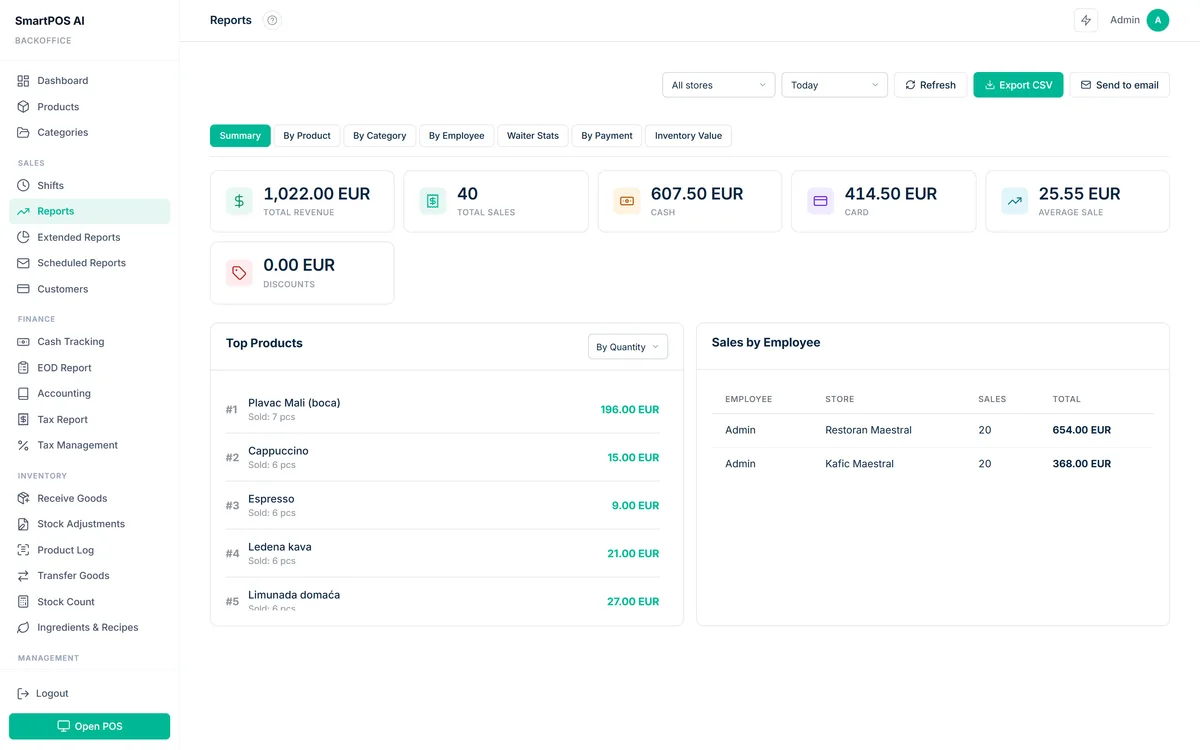
SmartPOS AI provides a comprehensive suite of reports in the backoffice dashboard, each designed to answer specific business questions. This guide walks you through every report available and explains exactly what insights you should be extracting from each one.
Sales Dashboard
The Sales Dashboard is your daily command center. It shows total revenue, transaction count, average ticket size, and comparison against the previous period (yesterday, last week, or last month). At a glance, you can see whether today is tracking above or below your recent average.
The dashboard includes a timeline chart showing sales by hour, making it easy to identify peak and slow periods. Use this information to plan staffing, schedule promotions during off-peak hours, and set daily targets that are grounded in reality rather than guesswork.
Product Performance Report
This report ranks every product in your catalog by revenue, units sold, and profit margin. The top sellers are immediately visible, but the real value is at the bottom of the list: products that are barely moving and consuming shelf space that could be used for better performers.
The report also shows each product's trend over time. For an even more proactive approach, SmartPOS AI's AI-powered sales prediction engine can forecast these trends before they fully materialize. A product that was a strong seller three months ago but has been declining is worth investigating — perhaps the price needs adjusting, or it should be replaced with something new. Conversely, a product showing accelerating growth might deserve more prominent placement or larger stock orders.
Employee Performance Stats
Every transaction in SmartPOS AI is linked to the employee who processed it. The Employee Performance report aggregates this data to show each team member's total sales, transaction count, average ticket size, items per transaction, and void/refund rate.
This is not about surveillance — it is about coaching. For a comprehensive look at how to use these metrics effectively, read our employee management POS guide. If one employee consistently achieves higher average ticket sizes, study what they are doing differently. Are they upselling effectively? Do they suggest add-ons? You can use their approach as a training template for the rest of the team. Similarly, an unusually high void rate might indicate a training gap rather than a performance problem.
Category Breakdown
The Category Breakdown report shows revenue and unit sales grouped by product category. This gives you a clear picture of which departments or product lines are driving your business and which are underperforming.
For a retail store with categories like Electronics, Accessories, and Clothing, this report might reveal that Accessories generate the highest margin even though Electronics lead in total revenue. That insight could influence how you allocate floor space, marketing budget, and purchasing decisions.
Hourly Sales Patterns
The Hourly Sales report presents a heatmap of your sales volume by hour and day of week. This visualization makes it immediately obvious when your store is busiest and when it is quiet. The patterns often surprise business owners who rely on intuition alone.
Common use cases include optimizing staff schedules (more employees during peak hours, fewer during lulls), timing promotional offers (flash discounts during slow periods to drive traffic), and planning restocking activities during the quietest hours to avoid disrupting the customer experience.
Payment Method Analysis
Understanding how your customers pay is more important than many business owners realize. The Payment Method report breaks down revenue by cash, card, mobile wallet, QR code, and any other payment methods you accept.
Pairing payment data with customer retention insights gives you a complete picture of how your most valuable customers prefer to pay. If you discover that 70% of transactions are card-based, carrying excessive cash on hand is unnecessary and creates security risk. If mobile payments are growing rapidly, it might be worth investing in faster checkout flows for that method. This report also helps with cash flow forecasting, since different payment methods have different settlement timelines.
Profit and Loss Report
The P&L report in SmartPOS AI calculates your gross profit by subtracting the cost of goods sold (COGS) from revenue for any given period. This requires that you have entered cost prices for your products, which is strongly recommended.
The report shows profit margin at both the product level and the aggregate level. You might discover that your highest-revenue product has a razor-thin margin, while a modest seller delivers outstanding profitability. This information is critical for pricing decisions, promotional strategy, and supplier negotiations.
Cash Flow Report
The Cash Flow report tracks money coming in and going out, including cash sales, card settlements, refunds, and expenses. It helps you understand your net cash position at any point in time and forecast future cash availability based on historical patterns.
Discount Report
Every discount applied through the POS is tracked and reported. The Discount Report shows total discount value, number of discounted transactions, average discount percentage, and which discount codes or rules were used most frequently. This prevents discount abuse and helps you evaluate whether promotional campaigns are actually driving incremental sales or simply eroding margins on purchases that would have happened at full price.
End of Day (EOD) Report
The EOD report is a comprehensive summary generated at the close of each business day. It includes total sales, payment method breakdown, discounts given, refunds processed, cash drawer reconciliation, and employee totals. Many businesses print this report at the end of each shift as a physical record.
The most successful business owners spend ten minutes each morning reviewing yesterday's EOD report and ten minutes each week reviewing product performance. That twenty minutes of attention consistently outperforms hours of guesswork.
Getting Started with Reports
All reports in SmartPOS AI are available from the backoffice dashboard under the Reports section. They can be filtered by date range, store location, employee, and payment method. Every report is exportable to CSV for further analysis in spreadsheet tools. For programmatic access, the API documentation covers all reporting endpoints.
If you are not yet using SmartPOS AI, start your free 14-day trial and explore the full reporting suite. Your data is already waiting to tell you something valuable — you just need to listen.