A point of sale system handles some of the most sensitive data in your business: transaction records, customer information, employee details, and financial figures. A security breach at the POS level does not just compromise data — it can destroy customer trust, trigger regulatory penalties, and cause lasting reputational damage. Yet many small businesses treat POS security as an afterthought, relying on default settings and hoping for the best.
SmartPOS AI takes a defense-in-depth approach to security, building multiple layers of protection directly into the platform. This article explains the security features available to you and the best practices you should follow to keep your business data safe.
Employee PIN Login with Role-Based Access Control
Every employee who uses SmartPOS AI logs in with a unique personal identification number (PIN). This is the foundation of access control: it ensures that every action taken on the POS — every sale, void, refund, and discount — is attributed to a specific individual.
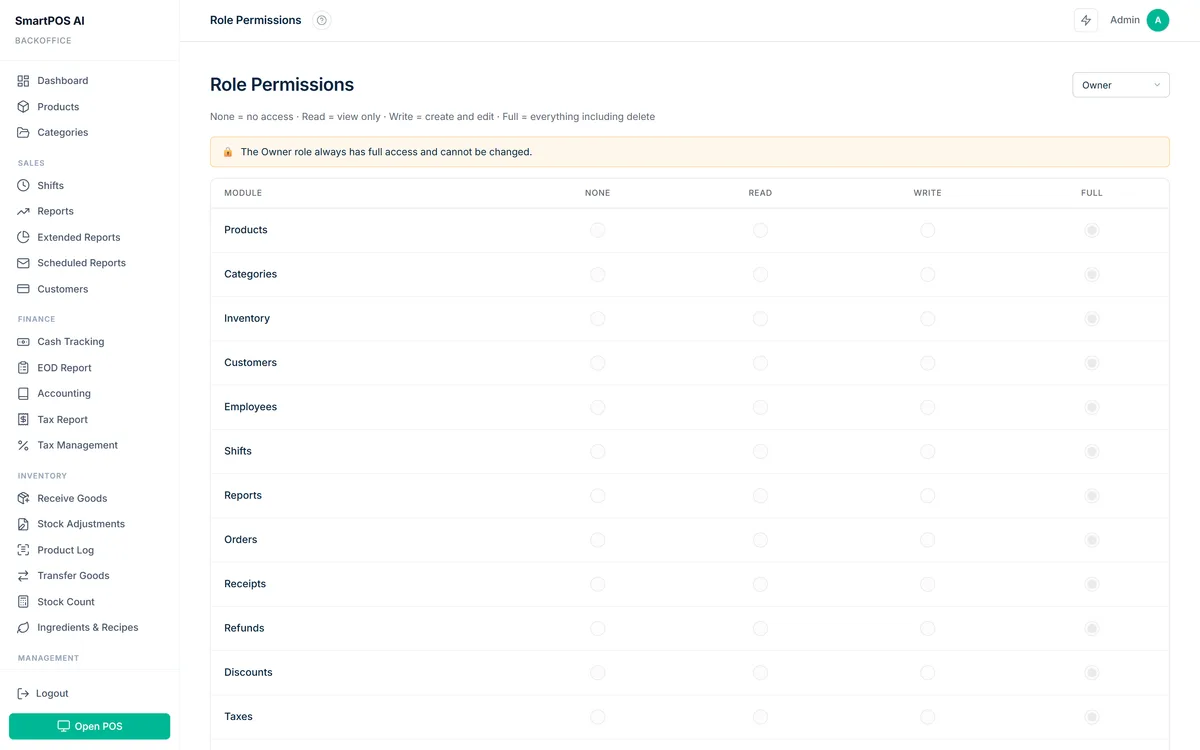
Beyond identification, the PIN login system enforces role-based access control (RBAC). You define roles in the backoffice (such as Cashier, Shift Manager, and Admin), and assign specific permissions to each role. A Cashier might only be able to process sales and apply predefined discounts. A Shift Manager can additionally process refunds and view daily reports. Only an Admin can access financial reports, change settings, or manage employee accounts.
This principle of least privilege means that even if an employee's PIN is compromised, the attacker can only access the functions assigned to that employee's role — not the entire system. For a complete walkthrough on setting up roles, permissions, and shift management, see our employee management POS guide.
Brute Force Protection
SmartPOS AI watches failed PIN sign-ins for each business. When there are too many failed attempts from addresses that have not signed in successfully before, PIN sign-in from such addresses is blocked for a while, and the block gets longer if the attempts continue, up to 24 hours. This stops attackers from systematically guessing PINs, while tills that are already working keep signing in normally. Each block is logged, and the owner can be notified by email.
You can switch this protection on or off and set the number of failed attempts and the length of the first block in the Backoffice, under Settings → Employees → Login security. Rate limiting is applied at the API level as well, preventing automated scripts from bombarding the authentication endpoints.
CSRF Protection
Cross-Site Request Forgery (CSRF) is an attack where a malicious website tricks a user's browser into making unwanted requests to your POS. SmartPOS AI protects against this: any state-changing request that relies on the sign-in cookie (creating a sale, modifying settings, processing a refund) must carry a CSRF token or a header that another website cannot add, and requests without it are rejected.
This protection works transparently — you do not need to configure anything. It is active by default on every SmartPOS AI installation.
API Key Security
For businesses that integrate SmartPOS AI with external tools via the REST API, security starts with proper API key management. SmartPOS AI generates unique API keys for each tenant, and keys can be regenerated at any time from the backoffice if you suspect a compromise.
Best practices for API key security include: never embedding keys in client-side code, storing keys in environment variables rather than source code, and rotating keys periodically. The API documentation covers authentication in detail.
Audit Logging
SmartPOS AI keeps an audit log of important actions, such as sign-ins, PIN and password changes, refunds, stock transfers, and changes to products, categories, customers, settings and employees. In the Backoffice you choose which groups of actions are recorded. Each entry includes a timestamp, the user who performed the action, and the details of what changed.
No user, including administrators, can edit or delete individual entries, and the log is kept until you set a retention period in the Backoffice. This provides a trustworthy trail that you can review to investigate discrepancies, resolve disputes, or comply with regulatory requests. Logs are accessible from the Backoffice and can be exported as a CSV file.
If something goes wrong, the first question is always "what happened and who did it." A detailed audit log gives you the answer immediately.
Loss Prevention Module
Internal theft and operational errors account for a significant portion of retail shrinkage. SmartPOS AI's loss prevention module looks for suspicious patterns such as unusually high void rates, voids without a reason, excessive discounts, unusual refunds, and cash discrepancies.
When the module finds such a pattern, it shows it on the loss prevention page in the Backoffice, where managers can review it. This is not about assuming the worst of your employees — it is about catching genuine problems early, whether they stem from fraud, errors, or training gaps.
Anti-Fraud and Tamper Detection
SmartPOS AI's anti-fraud module records events on the point of sale that can indicate tampering or misuse: a device clock that differs significantly from the server time, the app being closed while sales are still waiting to be synchronised, and the device going offline.
These events are listed in the Backoffice, so managers can check them against sales and shift reports. If the device clock is wrong, the cashier also sees a warning on the point of sale.
SSL Encryption and Data in Transit
All communication between SmartPOS AI devices and the cloud server is encrypted using TLS (SSL) encryption. This means that transaction data, customer information, and credentials cannot be intercepted by attackers on the same network. SmartPOS AI enforces HTTPS on all connections and does not support unencrypted HTTP access.
For businesses operating on shared or public WiFi networks (such as in shopping malls or co-working spaces), this encryption is especially critical.
GDPR Compliance
For businesses operating in the European Union or serving EU customers, GDPR compliance is a legal requirement. SmartPOS AI gives you tools to answer your customers' requests: in the Backoffice you can view, correct and delete a customer's record (right to erasure) and export your customer data as a CSV file (right of access).
Data is stored on servers in Germany (EU), and our Data Processing Agreement applies to all plans. The Privacy Policy explains how we handle personal data.
Take Action Today
Security is not a feature you enable once and forget. Review your SmartPOS AI settings regularly: audit your employee roles, rotate API keys, check the audit logs, and review loss prevention alerts. If you are currently using a basic or free POS solution, consider whether it offers the enterprise-grade security features described above — upgrading to a platform with built-in RBAC, audit logging, and anti-fraud detection can save you from costly breaches down the line. If you are not yet using SmartPOS AI, start your free trial and experience a POS that treats security as seriously as you do.