Every transaction your business processes generates data. The question is whether that data sits unused in a database or actively informs the decisions you make every day. POS analytics and reporting transforms raw transaction records into actionable insights about what is selling, when it is selling, who is buying, and what you should do next. SmartPOS AI includes a comprehensive analytics suite that puts business intelligence in the hands of every store owner, not just those with a data science team.
Sales Dashboard with KPIs
The SmartPOS AI dashboard is the first thing you see when you log into the backoffice. It presents your most critical key performance indicators at a glance: total revenue, number of transactions, average transaction value, gross profit margin, and comparison against the previous period. Sparkline charts show trends over the last 7, 30, or 90 days so you can immediately tell whether the business is growing, plateauing, or declining.
The dashboard is interactive. Click on any KPI to drill down into the underlying data. If average transaction value dropped this week, you can investigate which products or categories contributed to the change and take corrective action before the trend becomes a pattern.
Product Performance Ranking
Not all products contribute equally to your bottom line. The product performance report ranks every item by revenue, quantity sold, profit margin, or a combination of these metrics. At a glance, you can identify your best sellers, your highest-margin items, and the products that are not pulling their weight.
This report is invaluable for menu engineering in restaurants and assortment planning in retail. If a product generates high revenue but low margin, consider adjusting the price or renegotiating with the supplier. If a product has a great margin but low sales volume, it might need better placement, promotion, or bundling with a popular item.
Category Analysis
Zooming out from individual products, category analysis shows how entire product groups perform over time. Is your beverage category growing faster than food? Are accessories outselling core products? Category trends help you allocate shelf space, adjust purchasing, and plan promotions that align with what your customers actually want.
Employee Performance
Your staff directly influences sales outcomes. The employee performance report shows each team member's total sales, transaction count, average basket size, items per transaction, and upsell rate. Use this data to identify top performers for recognition and bonus calculations, and to pinpoint staff who would benefit from additional training.
Performance data can be filtered by shift, day, week, or custom date range. Compare how an employee performs during morning shifts versus evening shifts, or track improvement over time after a coaching session. Data-driven feedback is more specific, more fair, and more effective than subjective impressions. For a focused walkthrough of interpreting sales figures, see our guide to understanding POS sales reports.
Hourly Sales Patterns
Knowing when your customers buy is just as important as knowing what they buy. The hourly sales heatmap in SmartPOS AI visualizes transaction volume and revenue for every hour of every day of the week. Bright spots indicate peak hours; dim areas show slow periods.
This pattern data drives better staffing decisions. Schedule your strongest team for peak hours and reduce staffing during predictable lulls. It also helps you time promotions: a happy-hour deal during a 3:00 to 5:00 PM slump can lift revenue in a period that would otherwise be dead.
Payment Method Breakdown
Understanding how your customers pay helps you optimize payment processing costs and ensure you are offering the methods they prefer. SmartPOS AI breaks down transactions by payment method: cash, credit card, debit card, mobile wallet, online payment, and store credit. Each method shows its share of total revenue and transaction count.
If you notice that mobile wallet payments are growing rapidly, you might invest in better NFC hardware or promote that payment option more prominently. If cash transactions are declining, you could consider reducing your cash float and reallocating that capital elsewhere.
Profit and Loss Reports
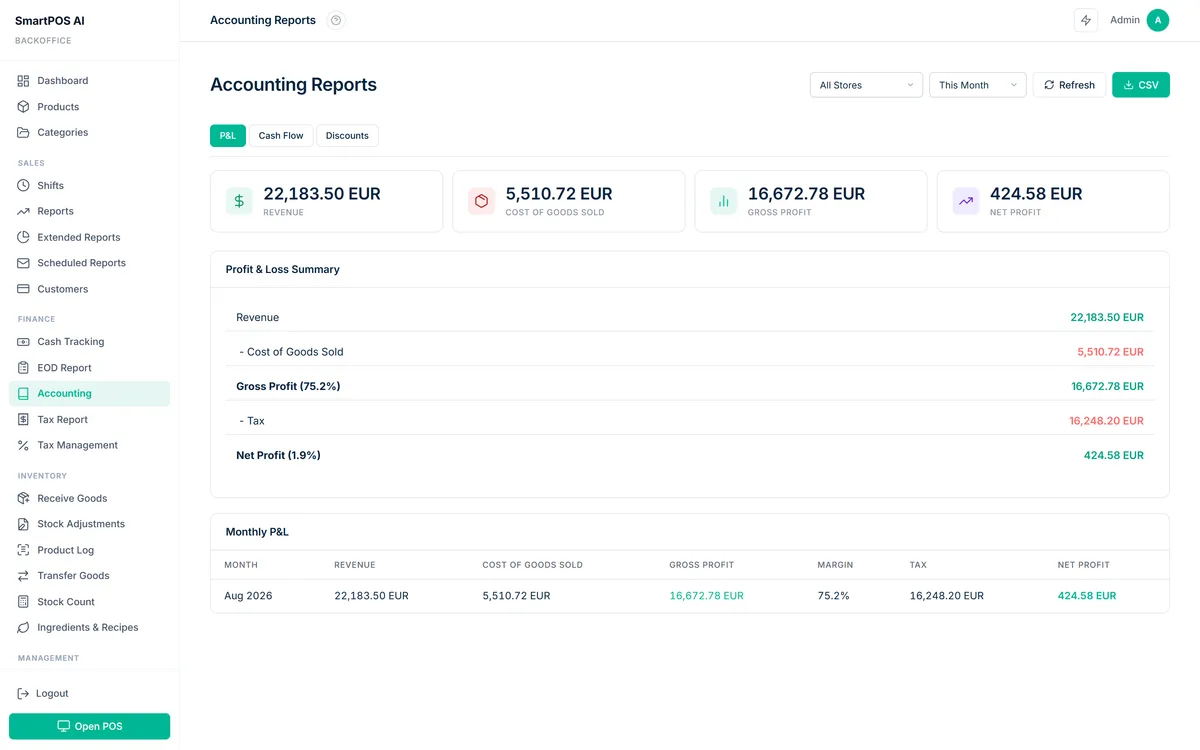
Revenue is only half the picture. The profit and loss report in SmartPOS AI calculates gross profit by subtracting cost of goods sold from revenue, broken down by product, category, or location. You can see which items and categories are truly profitable and which are dragging down your margins despite looking good on the top line.
Cash Flow Reports
Cash flow reports track the movement of money in and out of the business on a daily, weekly, or monthly basis. They include sales revenue, refunds, expenses logged in the system, and cash drawer variances. For businesses that deal heavily in cash, this report is essential for maintaining financial control and preparing for tax obligations.
Customer Segments with RFM Analysis
RFM stands for Recency, Frequency, and Monetary value. SmartPOS AI automatically segments your customer base using these three dimensions. Customers who purchased recently, buy frequently, and spend generously are your champions. Those who have not purchased in a while but were once active are at risk of churning. Each segment receives a label and suggested actions, for example sending a win-back offer to lapsed customers or an exclusive preview to your champions.
RFM segmentation turns your customer list from a flat database into a strategic asset. You can export segments for email campaigns, target loyalty promotions to specific groups, and measure the effectiveness of retention efforts over time. To see how these segments translate into actionable retention strategies, check out our guide on increasing customer retention with your POS.
AI Trend Predictions
SmartPOS AI goes beyond historical reporting with forward-looking predictions. The AI engine analyzes your sales data, identifies patterns, and forecasts revenue, product demand, and customer behavior for the coming days and weeks. These predictions help you prepare inventory, schedule staff, and plan marketing before demand materializes rather than reacting after the fact. For an in-depth look at how the prediction engine works, read our AI-powered sales predictions article.
Predictions are displayed alongside actual data so you can evaluate their accuracy and build confidence in the system's recommendations over time. The model improves as it ingests more data, becoming increasingly precise as your business history grows.
Scheduled Email Reports and Export
Not everyone checks the dashboard daily. SmartPOS AI lets you schedule reports to be emailed automatically on a daily, weekly, or monthly basis. Choose which reports to include, set the recipients, and the system delivers a formatted summary straight to their inbox. For ad-hoc analysis, every report is exportable to CSV or PDF with a single click, making it easy to share data with accountants, partners, or investors.
Data without action is just noise. The goal of POS analytics is not to collect numbers but to make better decisions, faster.
Start Making Data-Driven Decisions
SmartPOS AI analytics are included on every plan, giving you access to the same business intelligence tools that large chains use, without the enterprise price tag. Log into the backoffice, explore the reports, and let the data guide your next move. The insights are already there, waiting for you to act on them.